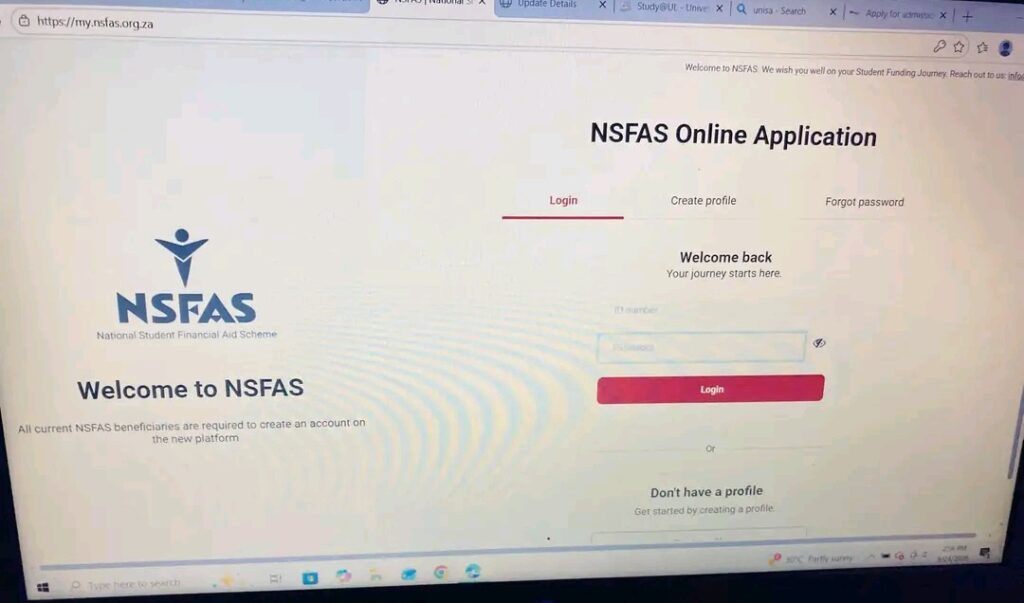
How to Access Your myNSFAS Account Without Your Registered Cellphone Number
The myNSFAS is a platform that will allow NSFAS funded students to view their funding status, see important messages and manage their student funding details. If a one-time PIN (OTP) is needed to complete the account verification process, however, it can be difficult to access an account if a cellphone number is lost or updated, or if a new phone is added.
Students who receive this notification can be stressed out due to the need to verify their funding status, provide additional documentation or finish a key process before a deadline.
The upside of this is that if you lose the number from your registered cellphone, your NSFAS funding will not be cancelled. There may be a need, however, for assistance to restore an account or change contact information.
This guide explains what students should do if they no longer have access to the cellphone number associated with their myNSFAS account, how to reach out to NSFAS for support and the precautions students should take when they regain access.
Why is your Registered Cellphone Number Important?
Students will establish a myNSFAS account with personal and contact details which will enable them to manage their applications and communicate with NSFAS.
The registered cellphone number can be used to get notifications or verification codes depending on the process of the account. If you no longer have access to that number you may have problems with some account activities.
These may include:
Logging in on your current myNSFAS account.
Being sent an OTP to confirm account.
Resetting of the password or some security checks.
Informing of change in personal details.
Receiving important application or funding notifications.
For instance, if a student loses his/her cell phone, they may change their number. The student tries to log in, but finds that the verification code is being sent to the old number.
Under this condition, the student should adhere to the account recovery procedure provided by the school rather than assuming that the app has gone missing or that he has to make another account.
To check all these, follow the steps below:
Step 1: Try Logging In to Your Existing myNSFAS Account
The first thing to do is to visit the official myNSFAS website at https://my.nsfas.org.za/.
Check to see if you can log in with the account information you already have. Once you’re able to log into your account, verify your profile or personal information area to see which options are available for updating your cellphone number.
Follow the directions which are provided in the official portal. If it is possible to type a new number into the system and to verify the number, be sure to do so.
Once you’ve updated your information, make sure the new number has been properly updated in your profile.
If it is a system that requires an OTP to be sent to your old cellphone number, however, you may not be capable of modifying it yourself. If you are unable to complete, seek assistance from NSFAS.
Do not try procedures over and over again which cannot be completed. Instead, describe the problem and inquire what are the verification steps needed to get back on.
Step 2: Contact NSFAS for Assistance
In the event that you are unable to log in as they no longer send verification codes to your registered number, please reach out to NSFAS via their official support lines.
Include that you are the account holder but you do not have access to the cellphone number on your myNSFAS profile. Request assistance to confirm your identity and to provide up-to-date contact information.
You can find the published contact information on the official NSFAS Contact Us page:
https://www.nsfas.org.za/content/contact.html
When sending messages or calls, the following are the channels that have been widely publicized:
Toll-free telephone: 08000 67327
Email: info@nsfas.org.za
WhatsApp: +27 63 093 5671
USSD: 12067327#
Please note that the information and services that are available can change so please check with the official website before contacting NSFAS.
Be specific when discussing your issue. Inform them that you don’t want to receive an OTP on your old number and know how to recover access to your old account.
NSFAS will have to let you know what procedure to follow. Don’t presume that all accounts can be upgraded on the same path.
Step 3: Get the information needed to verify your identity
When going to NSFAS, ensure you have the following details ready which might assist the NSFAS support team to locate your account.
As per your situation, you’ll need to give information like:
Student’s full name as on his/her NSFAS application.
An email address associated with your account.
Previous cellphone number (if you can remember it).
Your new cell phone number.
Details pertaining to your application/funding history.
Explain why you are no longer able to use the same number.
NSFAS reserves the right to ask for further details or supporting documentation to ensure that you are the rightful owner of the account.
Do not share sensitive information via an unsecured channel that is not approved by NSFAS. Share your South African ID number, copies of ID papers or other private information in public comments or WhatsApp groups.
When you are not sure of the authenticity of a request for personal information, confirm it on the official NSFAS contact page before you provide it.
Step 4: What If You Cannot Update Your Number Online?
As some students may not be able to make the phone change due to their inability to finish verification on-line.
For instance, your mobile phone could have been stolen, your SIM card has been lost or you have changed your number and not updated your NSFAS profile.
If this is the case, provide NSFAS with your situation and request to see if an alternative account-recovery or identity-verification procedure is available for you.
Make sure that you save your enquiry, along with the date that you made contact with NSFAS and if they assigned you a reference number, save that as well. This information may be used to follow-up if the problem hasn’t been solved.
Don’t go to an unofficial site that will claim to alter your number without confirmation. Procedures for account recovery may differ and only NSFAS will be able to tell you the right procedure for your account.
Step 5: Use Your Registered Email Address if You Still Have Access
If you still have access to your registered email address, follow the steps below:
If you no longer can receive SMS on your registered cellphone number, but you can still access your email account, this may be helpful for you to explain your issue to NSFAS.
Once you have confirmed that the support email address info@nsfas.org.za is up to date, you can write to it.
Tell them that you cannot get in contact with your previous cellphone number and request instructions on how to properly change your contact information.
Look on your email for a response in your Inbox, Spam and Junk folders. Save a copy of your message to follow-up later.
If you have lost your registered e-mail address as well, follow the procedure of the email provider to recover your e-mail address when such a process is available. Also, make sure to let NSFAS know that you are no longer able to use both of these means of contact.
Keep in mind that having an email account doesn’t eliminate the need for cellphone verification. Adhere to the guidelines given by NSFAS for your case.
Step 6: Avoid Creating a Duplicate myNSFAS Account
When you can’t access your original account, it can be tempting to just sign up for another one. But it’s preferable to get help to recover the previously used account first.
Having more than one account can cause confusion in finding your application or funding data. It can also add extra measures that need to be taken before the issue can be addressed.
Rather, reach out to NSFAS and advise why you are unable to access the account that you initially signed up with.
If NSFAS ask you to make another account, or if you have been told by NSFAS that it is appropriate to do so, then do so.
The goal is to get back into your original account and ensure that your information is correct.
Step 7: Keep a close eye on your funding status and deadline.
If you can’t receive an OTP, then you are experiencing an account-access issue. It is not a guarantee that your NSFAS funding has been approved, rejected, suspended or cancelled.
If you have to check your funding status, seek guidance from NSFAS whilst you are working to restore access.
Students at public universities or TVET colleges can also speak to their financial aid office about alternatives. The institution does not have the power to change your myNSFAS details, but it may be able to assist you to understand where to send your enquiry.
If NSFAS has asked for documents or something by a specific time, tell them your story about the problem with accessing the account as soon as possible. Educate yourself about what you should do during the wait for help, not automatically assuming that the deadline will be extended.
Address: Your registered address in the box where it applies.Email Template: Request to Update Your Registered Cellphone Number
Should you need to write to NSFAS, you may use the attached template.
Assistance needed: Please update my registered myNSFAS cellphone number.
Greetings NSFAS Support Team.
I need some help with my account on myNSFAS as I no longer have access to the cellphone number I registered with.
I can’t receive verification codes on the old number, which is blocking me from completing some actions related to accessing my accounts or updating my contacts.
How do I go about the official procedure to update the cellphone number and verify my identity with the site?
My details are:
Full name: Name of the person.
Registered email address: [Your email address]
Previous cellphone number: (If you have one, please enter it as shown below)
New cellphone number: (Your new number)
I will provide any and all information and supporting documents as needed via an approved and secure process.
Please advise me on the steps to be taken for recovering the access of my account.
Many thanks for your support.
Kind regards,
[Your full name]
Make sure the email address is up-to-date and correct before sending. Never attach documents which are sensitive without prior requests by NSFAS via the proper channels.
What Steps Can Take Students to Keep their Access?
To minimise the risk of students experiencing the same difficulties, students should ensure that their contact details are kept current.
The following precautions should be taken into account:
Don’t lose your cell phone number. If you change numbers, please proceed with the procedure prescribed by the official.
Maintain access to your email account. Maintain recovery information to be able to recover the account if needed.
Secure important data. Save application reference number and correspondence number in a safe place.
Monitor official communications. Look for information regarding NSFAS announcements, requests and significant deadlines.
Use secure login credentials. To prevent your account from being compromised, never give your password or OTP to any individual claiming to be able to recover your account.
Recover Lost SIM Card if possible. Ask your mobile network operator if they can replace the SIM, but not change the number.
The following habits will help students have access to their accounts in a timely manner without unnecessary delay.
Note: Be extra careful with any Unofficial NSFAS Account-Recovery Services.
When students are unable to log into their accounts, there may be individuals on social media platforms available for a fee to unlock the account or change the registered cellphone number.
If someone promises to recover your account, charges you for unlicensed help or insists that you provide them with your password or OTP, be wary of that person.
Do not give another individual your user name and password. Always check directions from an official NSFAS line before acting if someone claims to be from NSFAS.
The official recovery process is safer than entrusting personal information to strangers.
Frequently Asked Questions
Will the loss of my registered cellphone number affect my NSFAS funding?
Not cancelling a number does not automatically cancel a funding. Call NSFAS to check the exact amount of funding that has been allocated to you.
But what about if I lose my SIM card and want to retain my phone number?
Check with your cell phone carrier if they can provide you with a new sim card attached to your old phone number. Should you not be able to retrieve the number, please reach out to NSFAS.
May I provide my email address instead of cell phone number?
If you email, your email address can help you get in touch with NSFAS, but it won’t replace cellphone verification. Adhere to the instructions given for your account.
How long does it take to change your cellphone number?
It is based on the situation and proof that is provided. Inquire with NSFAS regarding the process and any additional requirements.
Should I create a new myNSFAS account?
If possible, log into your account you have. Only register for an additional account if the guidance of the NSFSAS or other official guides can be used for you.
Final Thoughts
The best you can do if you can’t access your cellphone number is to attempt it via the portal. But if you don’t have a way to get the OTP, it is worth reaching out to NSFAS and requesting that they assist you with verifying your identity.
Secure your information and dont create duplicate accounts unless directed otherwise, avoid paying unauthorised agents for unlocking your account.
Most importantly, don’t assume that once your cellphone number is removed, your funding has been cancelled. Check your status and clear up the account access issue immediately.
Official resources: